Hi;
I am trying to export out some of the content into an XML file using a DXL script but I have a problem exporting into the correct format.
How do you write to a file that is UTF-8? I create a stream but it always ends up ANSI which means there is no Rich Text support
Stream writingStream = write myfileName
Thanks in advance
Will
CKMT_Will_Scott - Thu Jun 25 20:55:24 EDT 2015
Re: DXL write file with UTF-8 encoding
Mathias Mamsch - Fri Jun 26 05:25:37 EDT 2015
Since DOORS 8 there are two different variants of the Stream functions:
Stream read (string)
Stream read (string, int)
The second variant takes an encoding parameter, where you specify to read/write your stream with a special encoding. See DXL Manual.
Regards, Mathias
Re: DXL write file with UTF-8 encoding
Wolfgang Uhr - Mon Jun 29 11:29:23 EDT 2015
The Richtext of doors is an ansi-format
Place a text providing the german special chararcter into the object text property of a test object and read the rtf-string you get from
Test äöü
{\rtf1\ansi\ansicpg1252\deff0\deflang1031{\fonttbl{\f0\fnil\fcharset0 Tahoma;}}
{\*\generator Msftedit 5.41.21.2510;}\viewkind4\uc1\pard\f0\fs20 Test \'e4\'f6\'fc\par
}
Re: DXL write file with UTF-8 encoding
rykrull - Fri Feb 10 08:43:49 EST 2017
I am writing a dxl script that will override an existing file that was generated from the export, spreadsheet... option from the DOORS GUI module. When exported from the GUI, this CSV file has an encoding of UTF-8 with the BOM signature. My dxl script uses the command below.
write( string, CP_UTF-8 )
Even with this, the encoding for my dxl script export still shows as ANSI when I compare the GUI generated CSV and my dxl script generated CSV. When I try to manually insert the BOM signature  (found in the GUI generated CSV) at the beginning of the stream, it then recognizes that the dxl generated CSV encoding is UTF-8, but does not recognize the BOM signature  at the beginning. I would like to keep the format consistent so that any manual exports will use the same formatting.
Any help would be appreciated, thanks.
Ryan
Re: DXL write file with UTF-8 encoding
Mathias Mamsch - Fri Feb 10 09:09:47 EST 2017
rykrull - Fri Feb 10 08:43:49 EST 2017
I am writing a dxl script that will override an existing file that was generated from the export, spreadsheet... option from the DOORS GUI module. When exported from the GUI, this CSV file has an encoding of UTF-8 with the BOM signature. My dxl script uses the command below.
write( string, CP_UTF-8 )
Even with this, the encoding for my dxl script export still shows as ANSI when I compare the GUI generated CSV and my dxl script generated CSV. When I try to manually insert the BOM signature  (found in the GUI generated CSV) at the beginning of the stream, it then recognizes that the dxl generated CSV encoding is UTF-8, but does not recognize the BOM signature  at the beginning. I would like to keep the format consistent so that any manual exports will use the same formatting.
Any help would be appreciated, thanks.
Ryan
Did you make sure that your DXL script file is encoded in UTF-8 and put a
pragma encoding, "utf-8"
at the top of your DXL file? If you write string literals from your DXL file to the CSV they can have the wrong encoding, if the DXL file does not have the right encoding. Regards, Mathias
Re: DXL write file with UTF-8 encoding
rykrull - Fri Feb 10 09:14:29 EST 2017
Mathias Mamsch - Fri Feb 10 09:09:47 EST 2017
Did you make sure that your DXL script file is encoded in UTF-8 and put a
pragma encoding, "utf-8"
at the top of your DXL file? If you write string literals from your DXL file to the CSV they can have the wrong encoding, if the DXL file does not have the right encoding. Regards, Mathias
Wow! Thanks for the quick response. Yes, this is what I was missing. I get the correct encoding now.
Thanks,
Ryan
Re: DXL write file with UTF-8 encoding
rykrull - Fri Feb 10 09:26:46 EST 2017
Mathias Mamsch - Fri Feb 10 09:09:47 EST 2017
Did you make sure that your DXL script file is encoded in UTF-8 and put a
pragma encoding, "utf-8"
at the top of your DXL file? If you write string literals from your DXL file to the CSV they can have the wrong encoding, if the DXL file does not have the right encoding. Regards, Mathias
Hmm, I forgot to remove the special characters (for the BOM signature that did not work) as I had noted in my first post that allowed the file to show as UTF-8. After removing those and adding
pragma encoding, "utf-8"
at the top of my file, and still using the
write( string, CP_UTF-8 )
command, the output CSV file still shows an ANSI encoding. I'll keep researching what may be the cause.
Thanks,
Ryan
Re: DXL write file with UTF-8 encoding
Mathias Mamsch - Fri Feb 10 09:38:22 EST 2017
rykrull - Fri Feb 10 09:26:46 EST 2017
Hmm, I forgot to remove the special characters (for the BOM signature that did not work) as I had noted in my first post that allowed the file to show as UTF-8. After removing those and adding
pragma encoding, "utf-8"
at the top of my file, and still using the
write( string, CP_UTF-8 )
command, the output CSV file still shows an ANSI encoding. I'll keep researching what may be the cause.
Thanks,
Ryan
Where does your data come from? In DOORS its not like in other languages - when the data inside your string is encoded with a codepage you will get this in the file, DOORS will not convert it for you. Regards, Mathias
Re: DXL write file with UTF-8 encoding
rykrull - Fri Feb 10 09:57:13 EST 2017
Mathias Mamsch - Fri Feb 10 09:38:22 EST 2017
Where does your data come from? In DOORS its not like in other languages - when the data inside your string is encoded with a codepage you will get this in the file, DOORS will not convert it for you. Regards, Mathias
With your suggested pragma line at the top of the dxl file, I am using the read command
read(aCSVPath, CP_UTF8)
to get the column headers of a CSV encoded in UTF-8 with BOM through parsing the first line. I can call for each object in the module
ob."column header"
to stream each cell with with quotation marks on either side (if it is not strictly numeric) and commas to keep the same formatting as the existing CSV file, but populate it with any changes that have been made to the DOORS table. The stream write command I'm using is
Stream lStream = write(aCSVPath, CP_UTF8)
All of my code is contained within this one dxl script.
Re: DXL write file with UTF-8 encoding
Mathias Mamsch - Fri Feb 10 10:24:35 EST 2017
rykrull - Fri Feb 10 09:57:13 EST 2017
With your suggested pragma line at the top of the dxl file, I am using the read command
read(aCSVPath, CP_UTF8)
to get the column headers of a CSV encoded in UTF-8 with BOM through parsing the first line. I can call for each object in the module
ob."column header"
to stream each cell with with quotation marks on either side (if it is not strictly numeric) and commas to keep the same formatting as the existing CSV file, but populate it with any changes that have been made to the DOORS table. The stream write command I'm using is
Stream lStream = write(aCSVPath, CP_UTF8)
All of my code is contained within this one dxl script.
Ok, so let me summarize:
- Your DXL script file is UTF-8 encoded and you have the pragma encoding inside the dxl file
- You are reading attribute values from DOORS and you are writing them to a Stream, opened by write(..., CP_UTF8) ...
- Inside the written file, you have some non ASCII characters encoded how exactly?
Can you provide an example of the CSV you generate which contains the encoded characters that you consider wrong?
Regards, Mathias
Re: DXL write file with UTF-8 encoding
rykrull - Fri Feb 10 11:19:08 EST 2017
Mathias Mamsch - Fri Feb 10 10:24:35 EST 2017
Ok, so let me summarize:
- Your DXL script file is UTF-8 encoded and you have the pragma encoding inside the dxl file
- You are reading attribute values from DOORS and you are writing them to a Stream, opened by write(..., CP_UTF8) ...
- Inside the written file, you have some non ASCII characters encoded how exactly?
Can you provide an example of the CSV you generate which contains the encoded characters that you consider wrong?
Regards, Mathias
Unfortunately I can not provide a the CSV files I'm creating as they contain proprietary information. Essentially what I am trying to do is create an automated export mimicking the output of the commas.dxl encrypted DOORS spreadsheet export, which when used through file, export, spreadsheet..., and setting the encoding as 65001 (UTF-8) sets the file encoding as UTF-8 with a BOM signature.
Currently, if I look at a file generated through commas.dxl and my dxl script though notepad++ or beyond compare, the files are identical, other than their file encoding.
The cells are identical graphically and in text format.
It's not a big problem for the file encoding to be different, but it would ensure that when I used beyond compare, it would not detect any differences between the files.
Beyond compare shows the file to be UTF-8 BOM when generated by commas.dxl, and ANSI when generated by mine. I am not which components are not encoded the same, or how to find the encoding of individual characters.
Apologies for the difficulties and thanks for your help,
Ryan
Re: DXL write file with UTF-8 encoding
Mathias Mamsch - Fri Feb 10 12:41:37 EST 2017
rykrull - Fri Feb 10 11:19:08 EST 2017
Unfortunately I can not provide a the CSV files I'm creating as they contain proprietary information. Essentially what I am trying to do is create an automated export mimicking the output of the commas.dxl encrypted DOORS spreadsheet export, which when used through file, export, spreadsheet..., and setting the encoding as 65001 (UTF-8) sets the file encoding as UTF-8 with a BOM signature.
Currently, if I look at a file generated through commas.dxl and my dxl script though notepad++ or beyond compare, the files are identical, other than their file encoding.
The cells are identical graphically and in text format.
It's not a big problem for the file encoding to be different, but it would ensure that when I used beyond compare, it would not detect any differences between the files.
Beyond compare shows the file to be UTF-8 BOM when generated by commas.dxl, and ANSI when generated by mine. I am not which components are not encoded the same, or how to find the encoding of individual characters.
Apologies for the difficulties and thanks for your help,
Ryan
You do not need to post a complete file. I just want to know
a) What the string in DXL looks like when you print it
b) What it looks like, after you wrote it to the file (hex view!)
c) What you expected it to look like instead.
Screenshots are fine. Regards, Mathias
Re: DXL write file with UTF-8 encoding
rykrull - Fri Feb 10 14:06:42 EST 2017
Mathias Mamsch - Fri Feb 10 12:41:37 EST 2017
You do not need to post a complete file. I just want to know
a) What the string in DXL looks like when you print it
b) What it looks like, after you wrote it to the file (hex view!)
c) What you expected it to look like instead.
Screenshots are fine. Regards, Mathias
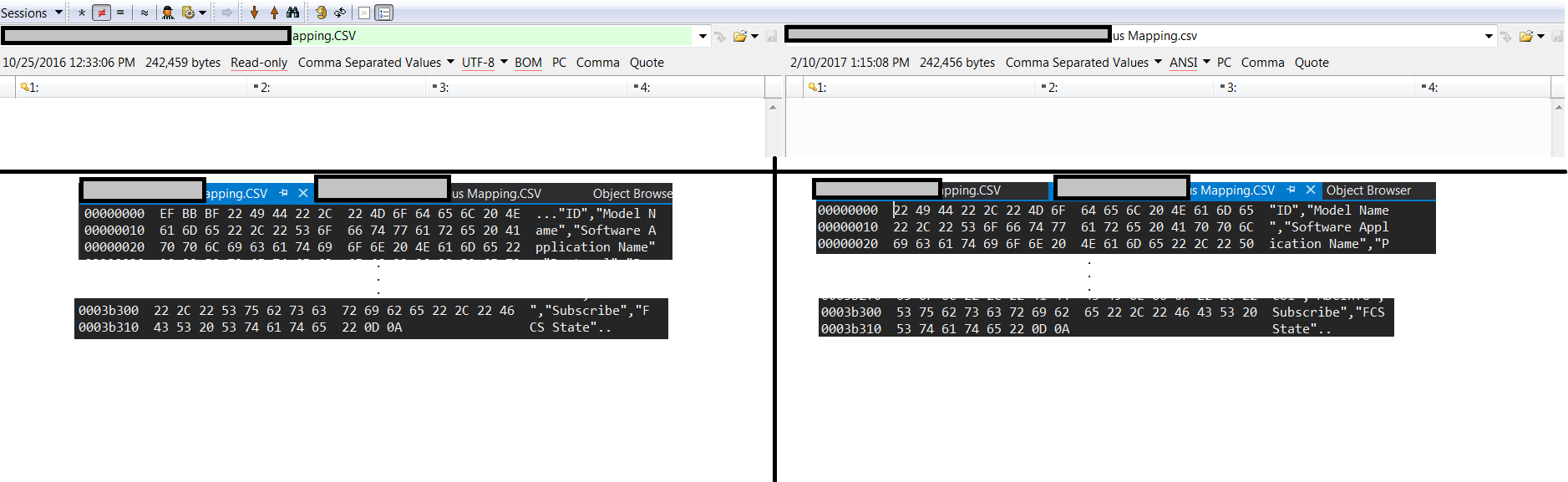
So the exported files differ slightly. The top of the image shows the file representation in beyond compare, with the red underlined text showing the file differences. The left side is the standard spreadsheet export from DOORS, while the right side shows my custom dxl export. The only difference between the files in hex is the EF BB BF added to the front which corresponds to . This is the BOM signature for UTF-8.
There are no other differences between the two files in hex. The rest of the text is outputting as I would expect. If I try to stream the extended ascii symbols  directly as a string, the hex shows C3 AF C2 BB C2 BF instead of the desired EF BB BF.
Thanks, Ryan
Re: DXL write file with UTF-8 encoding
Mathias Mamsch - Fri Feb 10 16:09:15 EST 2017
rykrull - Fri Feb 10 14:06:42 EST 2017
So the exported files differ slightly. The top of the image shows the file representation in beyond compare, with the red underlined text showing the file differences. The left side is the standard spreadsheet export from DOORS, while the right side shows my custom dxl export. The only difference between the files in hex is the EF BB BF added to the front which corresponds to . This is the BOM signature for UTF-8.
There are no other differences between the two files in hex. The rest of the text is outputting as I would expect. If I try to stream the extended ascii symbols  directly as a string, the hex shows C3 AF C2 BB C2 BF instead of the desired EF BB BF.
Thanks, Ryan
Aah now I understand - you want to write the BOM from DXL... Well, in this case, I think you need to resort to opening the file twice:
One in binary to write the BOM and then in text mode (append) to write the rest:
string file = "C:\\temp\\test.txt";
Stream x = write binary file;
x << (charOf 0xEF) (charOf 0xBB) (charOf 0xBF) "";
close x
x = append(file, CP_UTF8);
x << "äöü"
close x;
Hope this helps, regards, Mathias
Re: DXL write file with UTF-8 encoding
rykrull - Fri Feb 10 16:33:10 EST 2017
Mathias Mamsch - Fri Feb 10 16:09:15 EST 2017
Aah now I understand - you want to write the BOM from DXL... Well, in this case, I think you need to resort to opening the file twice:
One in binary to write the BOM and then in text mode (append) to write the rest:
string file = "C:\\temp\\test.txt";
Stream x = write binary file;
x << (charOf 0xEF) (charOf 0xBB) (charOf 0xBF) "";
close x
x = append(file, CP_UTF8);
x << "äöü"
close x;
Hope this helps, regards, Mathias
Perfect. There's one spelling error for anyone who comes to this thread for reference. After this change the export works exactly as I wanted.
x << (charOf 0xEF) (charOf 0xBB) (charOf 0xEF) "";
Thanks for your help,
Ryan